







Step-by-step · Sales

For sales teams using Claude, the real question is: can you trust the data enough to act on it?

Everything happens in one conversation with Gama, Vasco's setup agent. Five steps: hire an agent, pick the output, connect your CRM and call recorder, approve your customer journey, get the report.

Start for freeRead the guideAbout 20 minutes, most of it waiting on the first sync

Revenue teams already running on Vasco

Inovia CapitalLeanScaleLightspeedConnect&GOVesseleliawazoBilldrGarageCapitalBY Venture PartnersTHCAP
5 steps
in one conversation, no implementation project
Read-only
OAuth connection to your CRM
1st report
built on your own data, same day

01 · The problem

Your stack won't tell you it's wrong.

Connectors give an AI access to your CRM records, call transcripts, billing events and Slack threads. Every one of them reports CONNECTED — and you still get a pipeline summary that reads exactly like being right. Four pipes are still pipes. The gap is what sits between them.

21.9%

Data integrity

Protocol pipeline
4 of 4 connected · 0 reconciledThe pipes work. The architecture between them doesn't exist.
01

No shared definitions

A qualified lead in the CRM, a high-intent signal in Gong and a converted trial in billing may describe the same account — or three different ones. Nothing can reconcile what nobody has defined.

02

No identity resolution

The same contact is a CRM record, a call participant and a billing customer. Without resolution, the call where budget was flagged never connects to the deal where it matters.

03

No outcome memory

Every deal is assessed from scratch. Nothing remembers that the last four deals stalled at stage 3, with no exec contact and a competitor named on calls, all closed lost.

04

No cross-tool sequencing

The CRM thinks in deals, the recorder in calls, billing in subscriptions. Nobody has said how they relate, how to sequence them into a deal journey, or which signal wins when they conflict.

3–6%

win rate

An agent scores every call against winning patterns, not gut feel.

15–25%

faster ramp

New reps get feedback after every call, in Slack the next morning — not once a month.

99.5%

forecast accuracy

Same pipeline read from raw CRM data alone: 21.9%.

Certified partners & compliance

Google Cloud PartnerWinning by DesignPavilionRevOps Co-OpSOC 2 Type IIGDPR Compliance

02 · The setup

How to set up Vasco, step by step

About 20 minutes, most of it waiting on the first sync. Everything below happens in one conversation with Gama, Vasco's setup agent.

013 min

Sign up and set your reporting basis

Four short forms before the conversation starts. They define how every later number is reported.

  1. 01.1Sign up and verify your email.
    Try for free
  2. 01.2Name your organisation.
  3. 01.3Set your reporting preferences: fiscal year, revenue reporting and currency.
  4. 01.4You land in one conversation with Gama, Vasco's setup agent — everything after this happens in the chat.
app.vasco.app
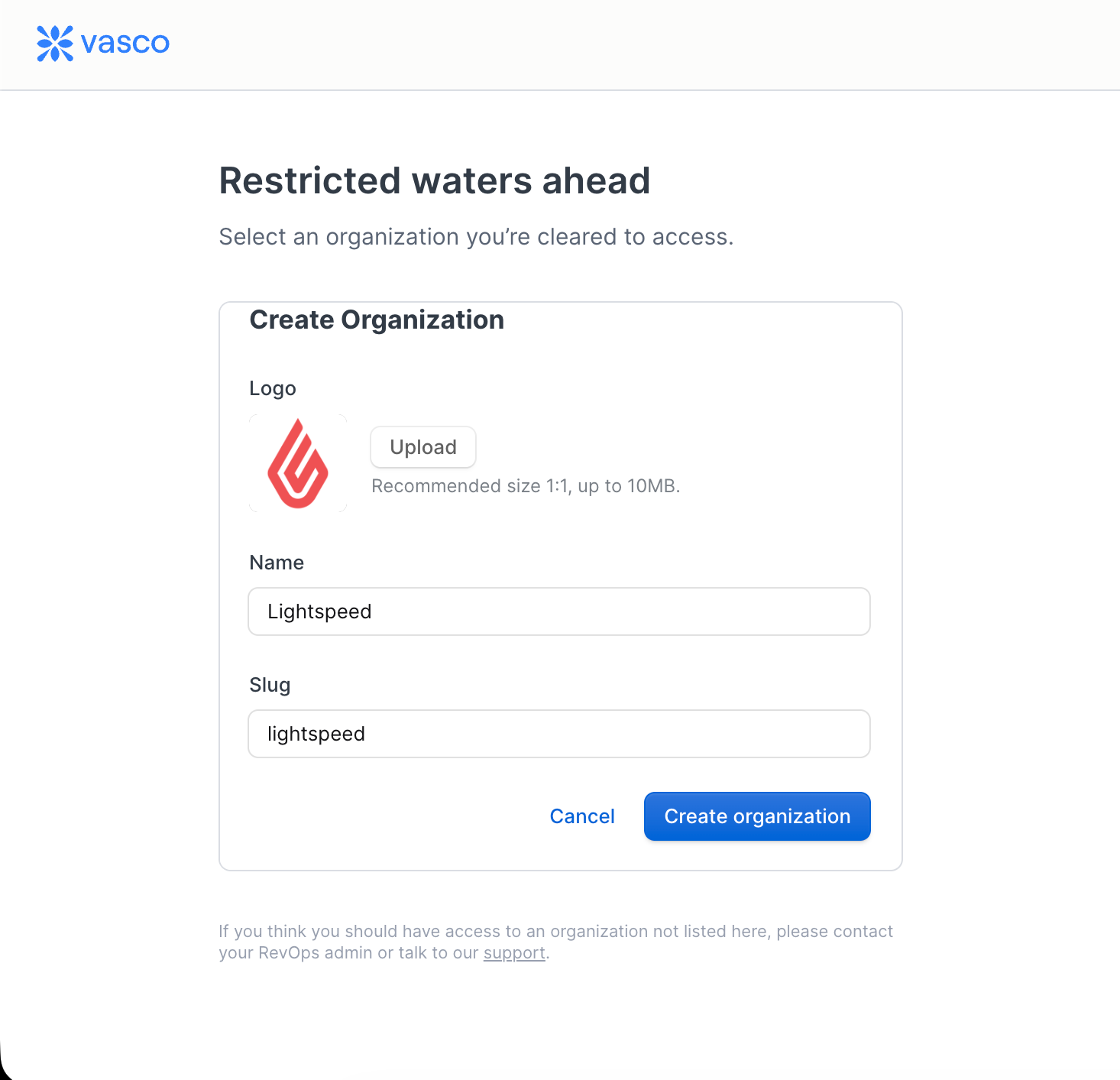
Vasco organisation creation screen with logo, name and slug fields
Right after sign-up: create the organisation your reports will live in.

No IT ticket

Nothing to install. The only approval you need is whatever your own CRM requires to authorise a read-only OAuth app.
023 min

Hire a sales agent

Gama asks which part of the go-to-market team you work in. Your answer filters the shortlist.

  1. 02.1Answer Sales. The shortlist filters to sales agents — call scoring, deal risk, forecast validation, rep coaching.
  2. 02.2Open an agent's profile to see exactly what it does before committing.
  3. 02.3Confirm to hire it. If nothing on the shortlist fits, open the full roster.
app.vasco.app
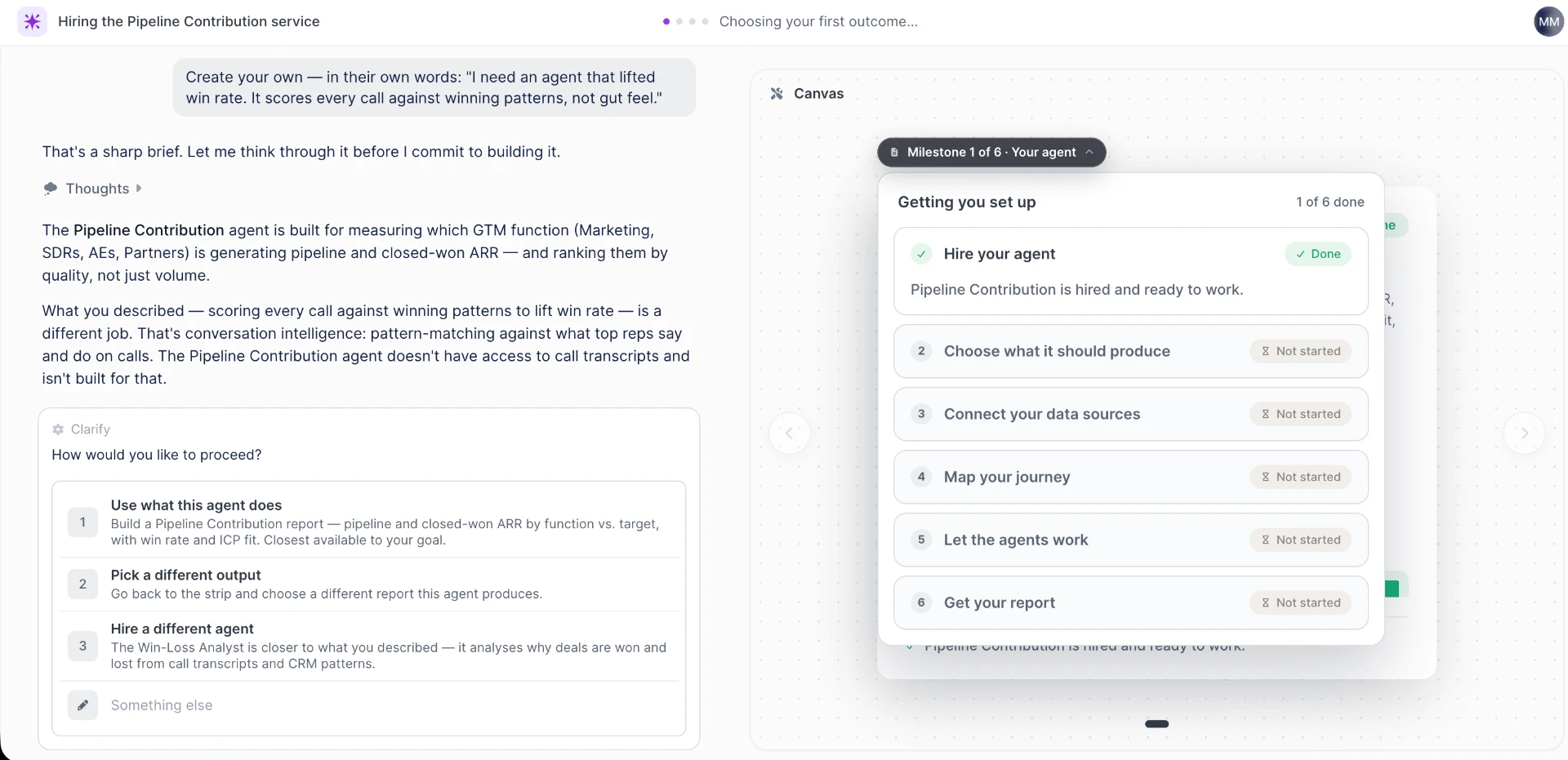
Gama challenging a custom agent brief and proposing three ways to proceed
Describe an agent in your own words and Gama pushes back — here it flags that call scoring is a different job, and offers the Win-Loss Analyst instead.

Arrived from a Hire link?

If you came in from a Hire button on the Vasco site, the agent is already selected and this step is skipped.

032 min

Pick the output you want first

The agent shows what it can produce as tiles. Selecting one previews the real report before you commit.

  1. 03.1Pick the report your team argues about most — pipeline coverage, deal risk, call quality or ramp.
  2. 03.2Check the preview: it is the actual report structure, not a mockup.
  3. 03.3If none of the tiles is right, describe the output you want in your own words.
app.vasco.app
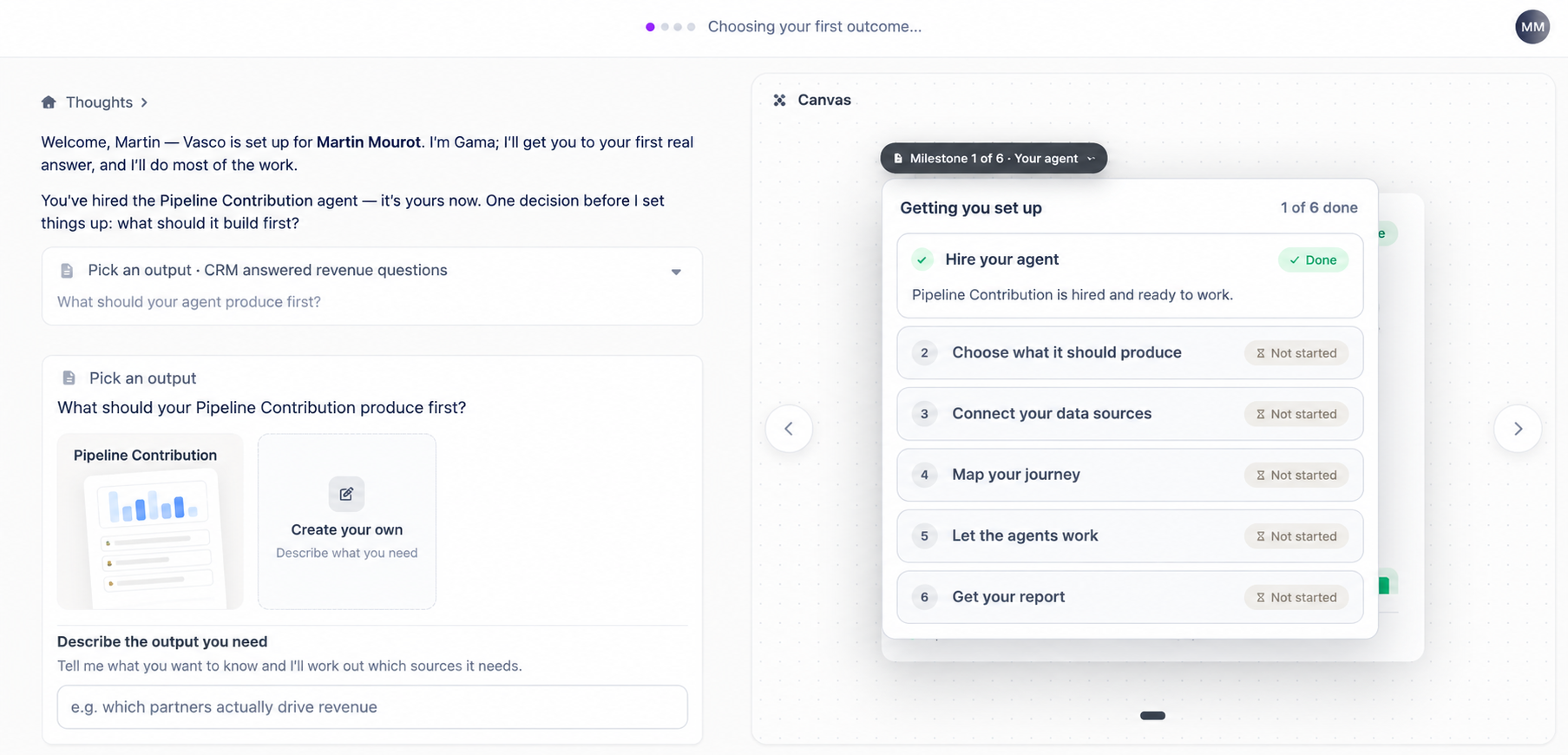
Pick an output screen with report tiles and the six-milestone setup canvas
Pick a ready-made output or create your own; the canvas on the right tracks the six milestones of the setup.
045 min

Connect your CRM and your call recorder

Connections happen inside the chat, through the standard OAuth screen. Read-only, with optional write-backs.

  1. 04.1Connect your CRM in the chat and let its first sync start.
  2. 04.2When the optional call recorder question comes up, connect it rather than skipping it.
  3. 04.3Watch each sync run in the canvas next to the conversation.
  4. 04.4You can leave once the CRM is connected — click Explore Vasco in the header and the conversation keeps running.
app.vasco.app
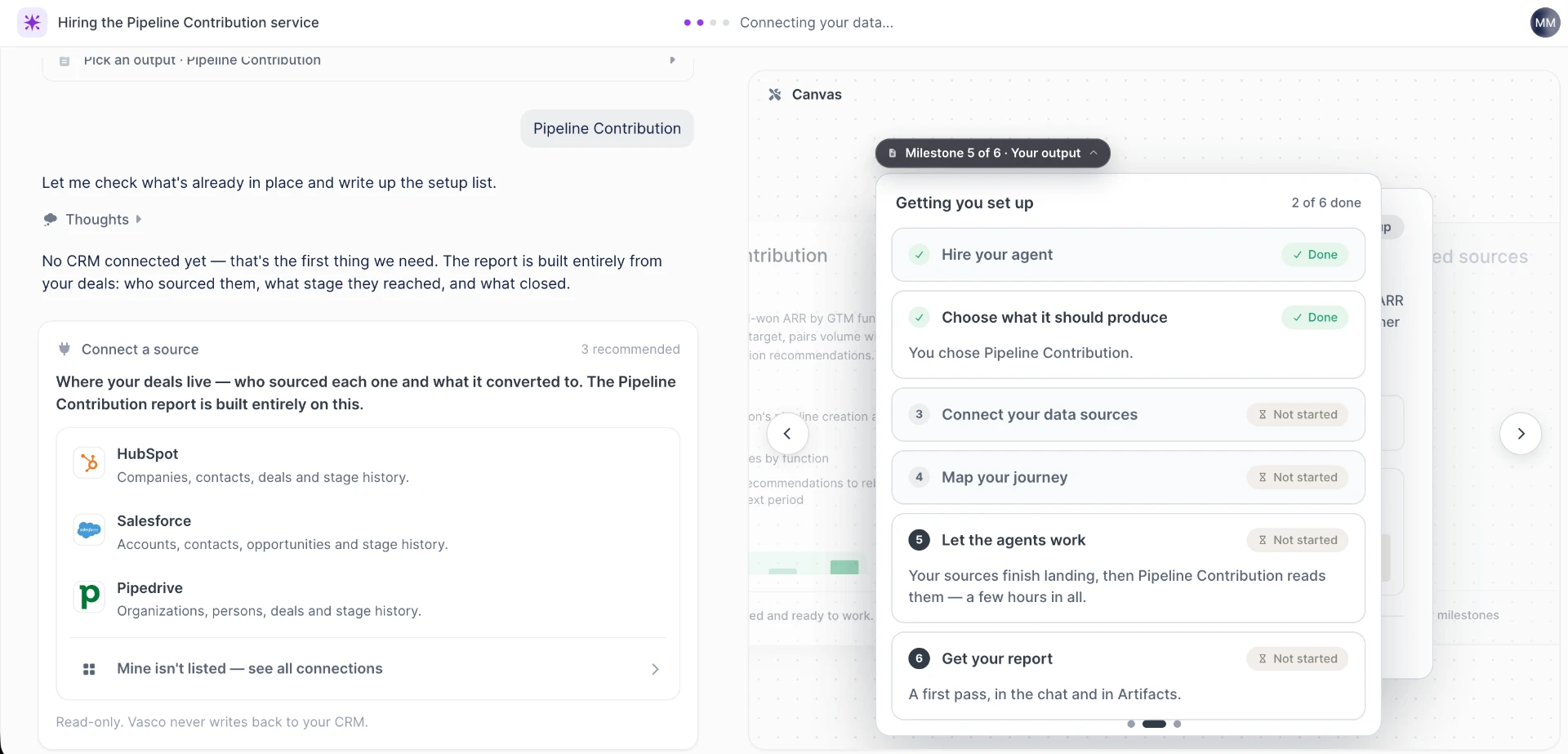
Connect a source screen listing HubSpot, Salesforce and Pipedrive
Gama recommends only the sources your chosen report actually needs. Read-only — Vasco never writes back to your CRM.

Why the recorder matters for sales

Anything that scores calls or coaches reps needs call data to work from. Skip it and you get pipeline shape without the reason behind it.

055 min

Approve how your stages map to the lifecycle

Gama reads your deal stages and proposes how they map onto Vasco's lifecycle. Nothing is written until you approve.

  1. 05.1Read the proposal carefully, stage by stage.
  2. 05.2Correct anything that does not match how your team actually runs stages.
  3. 05.3Approve. Forecast and deal-risk output depends on this mapping being right.

Definitions beat dashboards

Once approved, these definitions are what every agent reports against — so the same question asked twice returns the same number.

062 min + sync time

Get the report, then validate it

The agent builds the report once the CRM sync and the call recorder sync have both finished. You don't have to stay in the chat.

  1. 06.1Take the email me when it's ready option and go back to work.
  2. 06.2When the conversation closes, it offers four next steps: validate my numbers, put this on a schedule, ask questions about the report, hire another agent.
  3. 06.3Open the report and click through to the calls and CRM records behind any number.
Good first question to ask the reportprompt

List every deal above 30K in stage 3+ where champion engagement dropped in the last 21 days. For each one, show the last call summary and the usage trend — then rank by risk with the evidence.

After the first report

What to do next

  1. 01Run validate my numbers against a quarter you have already closed, where you know what the right answer was.
  2. 02Put the report on a schedule so it lands before your pipeline review rather than during it.
  3. 03Hire a second agent for the next question your team keeps rebuilding by hand.

Questions we get on this guide

Do I need RevOps to run this?

No. You need CRM admin rights to authorise the read-only OAuth app. Everything else is answering questions in a chat.

The first report looks provisional. Is that normal?

Yes. The first report is a first pass: the structure is real and the numbers are provisional until you run the validation session.

Can I check where a number comes from?

Every number links back to the calls and CRM records it was computed from.

Can I skip the call recorder?

You can, and nothing blocks. But call scoring, win-pattern analysis and rep coaching all need call data, so sales teams should connect it.

Run it on your own sales data

One conversation, a read-only CRM connection, and a first report the same day.

Start for free